


NovelZoom
2.5154.00 Reviews
App Specs
- Version
- 10.8.60
- Updated On
- License
- Free
- Downloads
- 100,000+
- Developer
- HK IReader Technology Limited
- Categories
- Books & Reference
- Platform
- Android
Screenshots


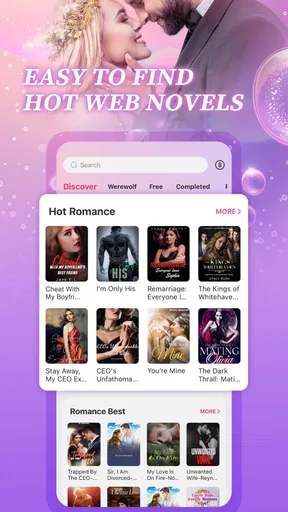
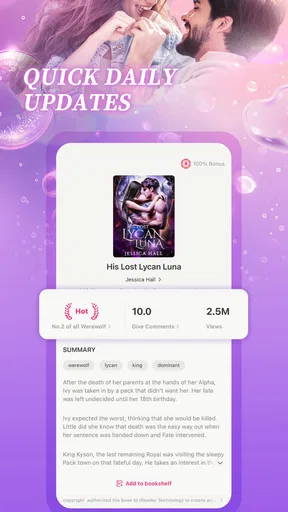
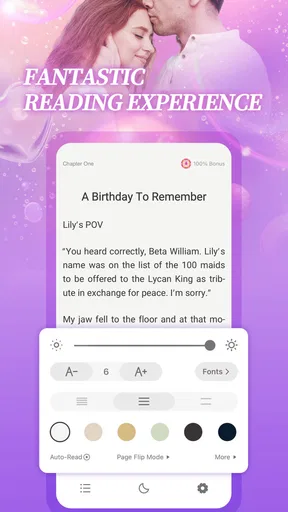
 Analysis by AppCompare
Before opening NovelZoom, it helps to know what kind of reader it is meant to serve. This is a romance-focused reading app from HK IReader Technology Limited, rather than a general-purpose ebook library. I’d approach it as a place to browse serial-style fiction and see whether a story’s tone, pacing, and ongoing chapters suit me, not as a replacement for every book source I already use.
That distinction matters on a first visit. Romance readers who enjoy trying unfamiliar stories may find the app more appealing than someone arriving with a specific author or title in mind. If I wanted classic literature, nonfiction, or a broad collection of reference books, I would start elsewhere. NovelZoom sits in the Books & Reference category, but its identity is much narrower than that label might suggest.
What to expect from a romance-first library
The app is free to install, and its content rating is Teen. Some stories may still explore mature relationship themes, so I’d use my own judgment about what feels appropriate rather than treating the age label as a promise that every plot is light or suitable for every reader. The app has a 2.4 average from 415 ratings, a modest signal that I would keep expectations measured and judge the reading experience myself instead of assuming it will work perfectly for everyone.
It has passed 100K installs, and version 10.8.60 is listed for devices running Android 7.0 or later. Those details make it easier to check basic compatibility before committing time to setup. I’d also remember that “free” does not necessarily mean every reading choice has no cost: in-app purchases range from $9.99 to $129.99 per item. Before paying, I’d look carefully at what an item buys and whether it fits the way I actually read.
A low-pressure first setup
When I try a fiction app for the first time, I avoid making a purchase or settling into a long series immediately. I browse for a premise that genuinely interests me, read enough to see whether the writing and chapter rhythm work for me, and check how the app presents the next reading step. That small test helps separate a story I’m curious about from one I only opened because its cover caught my eye.
I’d also give myself a simple stopping point before starting: one chapter, or a short reading break. Romance fiction can be designed around cliffhangers and continuing arcs, so it is easy to keep tapping even when I meant to read for only a few minutes. A deliberate trial makes it easier to decide whether the story is earning my attention and whether any paid option is worth considering.
Finding a first story that fits
For a first meaningful session, I’d choose a story based on the kind of emotional experience I want that day: something gentle for a quiet break, or a more dramatic relationship plot when I have time to follow the turns. I would not judge the whole app by the first cover or opening paragraph alone. A better test is whether the characters and pacing hold my interest after I’ve sampled the story enough to understand its direction.
Worth Reading Before You Choose

EA SPORTS FC Mobile 26 Is a Bigger Football Game, but It Takes Time

Flipboard Shows What News Apps Must Do Beyond the Feed

Switching to Android Auto Means Rethinking Your Driving Routine

Google Calendar Makes a Crowded Week Easier to Manage

Ludo King Makes the Most of the Minutes Between Plans

Baby Panda World Brings Quick Play to Modern Phones, but Its Game Library Feels Busy
One useful habit is to note the title and where I stopped before leaving the app, especially if I am sampling several stories. That prevents a common browsing problem: remembering a premise but not which book it belonged to. If I find a story I want to continue, I can make that one my active read and leave the rest as possibilities rather than opening too many at once.
What is NovelZoom?
First off, NovelZoom is an app designed for readers who crave variety and depth in their literary adventures. Whether you’re into thrillers, romance, sci-fi, or any other genre under the sun, this app has something for everyone. It’s like having a library in your pocket, but with way more features and a lot less dust.
Exploring the Features
One of the coolest things about NovelZoom is its personalized recommendation system. When you first sign up, the app will ask you about your reading preferences and then curate a list of books that match your taste. It’s like having a personal librarian who knows exactly what you’re into.
The app also boasts a vibrant community feature where you can join book clubs, participate in discussions, and even connect with authors. It’s a great way to share thoughts, get recommendations, and maybe even make some new friends along the way.
Another standout feature is the offline reading mode. We’ve all been there—stuck somewhere without Wi-Fi and wishing we had something to read. With NovelZoom, you can download books to your device and enjoy them anytime, anywhere. Perfect for those long commutes or lazy afternoons at the park.
As I use an app like this, I’d treat recommendations as a starting point, not a guarantee that every suggested title will suit my mood. A practical way to improve browsing is to compare a few premises before committing to one, then give the chosen story a fair sample. If the suggestions keep steering me toward plots I don’t enjoy, I’d switch to browsing by interest rather than repeatedly opening recommendations that miss the mark.
For a commute or a short break between errands, a continuing romance can be easier to pick up than a dense book that requires a long stretch of concentration. I’d choose a stopping point before putting my phone away and avoid starting a chapter just before I need to get off the bus or return to work. That is a small habit, but it makes serial reading feel like a treat rather than a source of frustration when a scene ends at the wrong moment.
Offline reading can be especially useful when connectivity is unreliable, but I’d prepare while I still have a connection: open the story I plan to read and confirm that it is available on the device before leaving. That way, I’m not discovering at the station or on a trip that I can’t reach the next part. I’d also keep expectations practical about offline access and treat it as a convenience for chosen reading, not as proof that every item in the app is automatically available without a connection.
Making the reading experience comfortable
Now, let’s talk about the user interface. NovelZoom has nailed the aesthetics with a sleek, modern design that’s easy on the eyes. Navigating through the app is a breeze, thanks to its intuitive layout. Whether you’re a tech whiz or a complete newbie, you’ll find it easy to get around.
The reading experience itself is customizable, allowing you to adjust font size, background color, and even text alignment. It’s all about making sure you’re comfortable while you dive into your next literary adventure.
I’d take a moment to set the text for the situation rather than searching for one perfect arrangement. Larger type can be helpful for a quick read while standing or when I’m tired; a calmer background may feel better during a longer evening session. If I change the settings often, I’d make a note of the combination I like so I can restore it after experimenting. These adjustments matter most when reading in short bursts, because less fiddling means more time with the story.
Compared with a general ebook reader, the attraction here is the focus on discovering romance fiction and following stories in an app built around that kind of reading. A broad ebook service may be a better fit if I want to bring books from different sources together or browse widely beyond romance. A physical book or a library app can also suit readers who prefer a settled, complete volume and do not want to think about in-app spending. I’d choose based on the reading habit I actually have, not on the assumption that one app should cover every format.
Where the experience can feel uncertain
A low average rating is a reason to be cautious, not a verdict on every story or every reader’s experience. I’d start with a small commitment, pay attention to how the app handles the story I chose, and avoid buying an item simply because I’ve reached a point where I want to keep reading. Since purchases can be substantial, it is sensible to pause and understand the cost before confirming anything, especially if I’m only testing the app.
Another possible mismatch is breadth. The original impression of a library spanning many genres can set expectations that do not match a romance-centered product. If I’m mainly looking for science fiction, thrillers, or reference material, I would compare other reading options instead of assuming those interests are equally served here. For readers who want relationship-focused fiction and enjoy sampling new plots, the narrower emphasis may be a benefit; for everyone else, it may feel limiting.
I’d also be realistic about community and recommendations. Social features can add value when I enjoy talking about characters or hearing what other readers liked, but they are not necessary to get something out of a story. If I prefer private reading, I can focus on the books and ignore community areas. If social discovery is the main reason I’m installing, I’d first see whether the discussions I encounter are useful and welcoming rather than assuming that every title has an active conversation.
Is It Worth Your Time?
So, is NovelZoom worth downloading? In my opinion, absolutely. The app does a fantastic job of bringing readers and stories together in a seamless and enjoyable way. It’s not just about reading books; it’s about experiencing them, sharing them, and discovering new favorites.
If you’re someone who loves to read but finds it hard to keep track of titles or discover new ones, this app could seriously change the game for you. And with its interactive community features, it offers way more than just a solitary reading experience.
All in all, NovelZoom is a must-try for any avid reader. It’s like having a tiny bookshop in your pocket that’s open 24/7. So why not give it a go? You might just find your next favorite book or even a whole new genre to explore. Happy reading!
My recommendation is to treat the first session as a focused trial: find one premise that appeals, read enough to judge its voice and pace, then decide whether the app deserves a regular place in your routine. If the story clicks, continue at your own pace and keep an eye on any purchase prompt before acting. If it doesn’t, there is little reason to force it; readers who want a wide-ranging ebook catalogue, predictable one-time book purchases, or a quiet reading tool without discovery and community elements may be happier with another option.
Pros
- User-friendly interface enhances reading experience.
- Wide variety of genres to explore.
- Offline reading available for convenience.
- Customizable fonts and themes.
- Regular updates with new content.
Cons
- Limited free content available.
- Occasional ads can be distracting.
- Requires internet for updates.
- Some genres lack depth.
- In-app purchases can be costly.
FAQs for NovelZoom
What is NovelZoom and what features does it offer?
NovelZoom is an innovative reading app that provides a vast library of novels across various genres. It offers features like personalized recommendations, offline reading, customizable fonts, and night mode for comfortable reading. Users can also participate in community discussions and leave reviews on their favorite books.
Is NovelZoom available for both Android and iOS devices?
Yes, NovelZoom is available for download on both Android and iOS platforms. You can find it on the Google Play Store for Android devices and the Apple App Store for iOS devices. Make sure your device meets the minimum requirements for smooth operation.
Does NovelZoom offer any subscription plans or in-app purchases?
NovelZoom provides both free and premium content. While many novels are accessible for free, a subscription plan unlocks additional premium content and features, such as ad-free reading and exclusive book releases. In-app purchases may also be available for specific titles or features.
Can I read books offline on NovelZoom?
Yes, NovelZoom allows you to download books for offline reading. This feature is perfect for users who want to enjoy their favorite novels without relying on an internet connection. Simply download the desired book while online, and access it anytime, anywhere.
How does NovelZoom ensure a personalized reading experience?
NovelZoom uses advanced algorithms to offer personalized book recommendations based on your reading history and preferences. Additionally, you can tailor your reading experience with customizable settings like font size, background color, and screen brightness to fit your comfort level.


